 Maxim Skorohod, SkoreHood
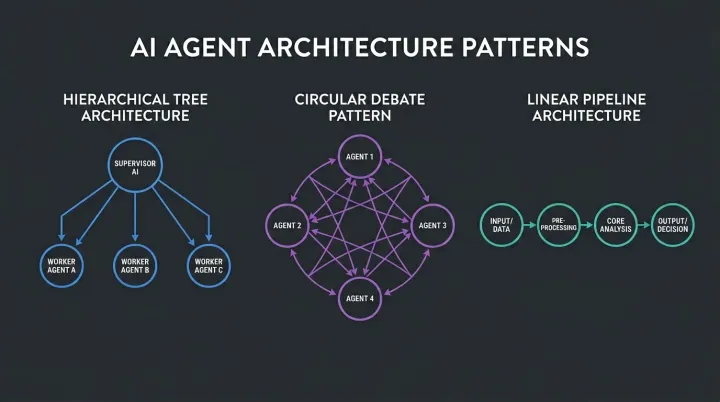
What is a multi-agent system?
A multi-agent system is a set of AI agents that each handle a defined part of a task and pass their results to the next step, usually under the control of a coordinating agent or a fixed workflow. The idea is division of labor: one agent qualifies a lead, another drafts a reply, another checks the draft against policy and CRM data.
It helps to separate three setups that often get mixed up:
- Single prompt. One model call does everything. Fast and cheap, but fragile when the task has many conditions.
- Workflow. Steps run in a fixed order that you design. Predictable, and a good default.
- Multi-agent. Several agents, each with its own instructions and tools, where some decisions about what to do next are made by a model rather than by your code.
Anthropic's engineering guide Building effective agents draws this line between workflows and agents and recommends starting with the simplest option that works. That is a good rule for a small business: most of the value comes from the first two setups, and the third should earn its place.
When does a multi-agent setup beat a single agent?
A multi-agent setup beats a single agent when the task has parts that need different tools, different permissions or an independent check, and when a single long prompt starts to fail in ways you can trace to overload. If one agent handles the job reliably, adding more only adds cost.
Signs that splitting makes sense:
- The agent's instructions have grown into pages of exceptions and it still misses cases.
- Different steps need different data access, for example one can read the CRM and another should only draft text.
- You need a second opinion, such as a checker that does not share the drafter's context.
- Parts of the work can run in parallel, like researching a lead while preparing a scheduling slot.
Signs that it does not:
- The task is a single decision or a short form fill.
- The steps are fixed and a normal automation can run them.
- You cannot yet measure the single-agent version, so you have nothing to compare against.
Anthropic's write-up of how it built its own research feature, How we built our multi-agent research system, is candid that multi-agent designs use substantially more tokens and suit tasks that benefit from parallel exploration. Most small-business workflows, such as booking or follow-up, are narrower than that.
How do you design roles and handoffs?
Design roles by giving each agent one job with a clear input and a structured output, and design handoffs as fields the next agent can rely on. Free-form text between agents is where errors multiply, because the next step has to guess what the last one meant.
Take an inbound-lead workflow as an example. This is an illustrative layout, not a description of a specific client deployment:
| Role | Input | Output (structured) | Cannot do |
|---|---|---|---|
| Intake agent | Call transcript or form | Name, service, location, urgency, contact method | Quote prices |
| Qualifier | Intake fields, service area rules | Qualified / not qualified / needs human, with a reason code | Book jobs |
| Scheduler | Qualified lead, calendar | Proposed slot or "no slot" | Change pricing |
| Checker | Draft confirmation, policy rules | Approve or reject with reason | Edit the draft itself |
| Human owner | Any "needs human" case | Decision and note | n/a |
Three rules keep this stable. First, every output has a fixed schema, so you can validate it in code before the next agent sees it. Second, every agent has an explicit "I cannot handle this" exit that routes to a person. Third, each role is testable alone: give it ten sample inputs and check the outputs without running the whole chain.
How much does a multi-agent system cost to run?
A multi-agent system costs more per task than a single call because each agent makes its own model calls, and some of them re-read shared context. The only reliable way to know is to measure tokens and time on real samples. The example below uses ASSUMED numbers to show how to reason about it.
Example: assume a single-agent flow uses 4,000 tokens per lead and a four-agent flow uses 14,000 tokens per lead. Assume the business processes 300 leads a month and the model price works out to $0.01 per 1,000 tokens (a placeholder, check your provider's current rates). The single-agent flow costs about $12 a month and the four-agent flow about $42. The difference is $30 a month.
That gap is trivial if the extra checks stop even one bad booking or one wrong quote a month. It is wasteful if the single agent was already accurate. The decision depends on error cost, not on token cost alone.
Track four numbers for both versions on the same sample of leads:
- Accuracy against a hand-checked answer key.
- Cost per lead, including retries.
- Time from lead received to action taken.
- Share of cases escalated to a human.
If the multi-agent version does not clearly improve accuracy or the escalation rate, go back to the simpler design. For a method to price the whole project, see our guide to AI agent ROI.
Where do multi-agent systems fail?
Multi-agent systems fail most often at handoffs, in loops and in unclear ownership. A single agent can be wrong in one place; a chain of agents can pass a small error forward until it becomes a large one.
- Lost context. The second agent never saw a detail from the customer and fills the gap with a guess.
- Compounding errors. Each step is 95% reliable, but five steps in a row are not. Add checks between steps.
- Agent loops. Two agents hand a case back and forth. Cap the number of rounds and escalate on the limit.
- Too much authority. An agent with write access to the CRM or calendar can create wrong records quickly. Give each role the minimum permissions it needs.
- No logs. When something goes wrong, nobody can see which step caused it.
Many of the same problems show up in single voice agents, which we cover in why AI voice agents fail. In a CRM setting, the failures often come from bad data rather than model quality: owners who left the company, leads with no next step, missing source fields. A read-only audit before any automation, like the HubSpot Leak Auditor, shows what your agents would inherit.
How do you keep humans in control?
You keep humans in control by deciding in advance which actions an agent can take alone, which need approval, and which are always done by a person. Authority should follow risk: low-risk steps run automatically, and anything that spends money, changes prices or contacts a customer in a new way waits for a human.
A practical permission ladder:
- Read only. The agent can look up data and propose an action.
- Draft. The agent writes a message or record, and a person sends or saves it.
- Act with a log. The agent performs routine, reversible actions such as tagging a lead or booking a standard slot, and every action is recorded.
- Act autonomously. Reserved for steps that have run cleanly for weeks and have low downside.
Start at step one or two and move up only when logs show consistent results. Name an owner for exceptions, with a response-time expectation, so escalated cases do not sit unseen.
Handoff to a person also applies at the customer-facing edge. If your agent talks to callers, define the triggers that pass a live call to staff; the guide to human handoff for voice agents lists the common ones. For CRM-heavy teams, the HubSpot Orchestration service is built on the same principle of read-first, then controlled action.
Want the same for your business?
We'll show you on a live demo which setup fits your numbers, no generic pitch.